
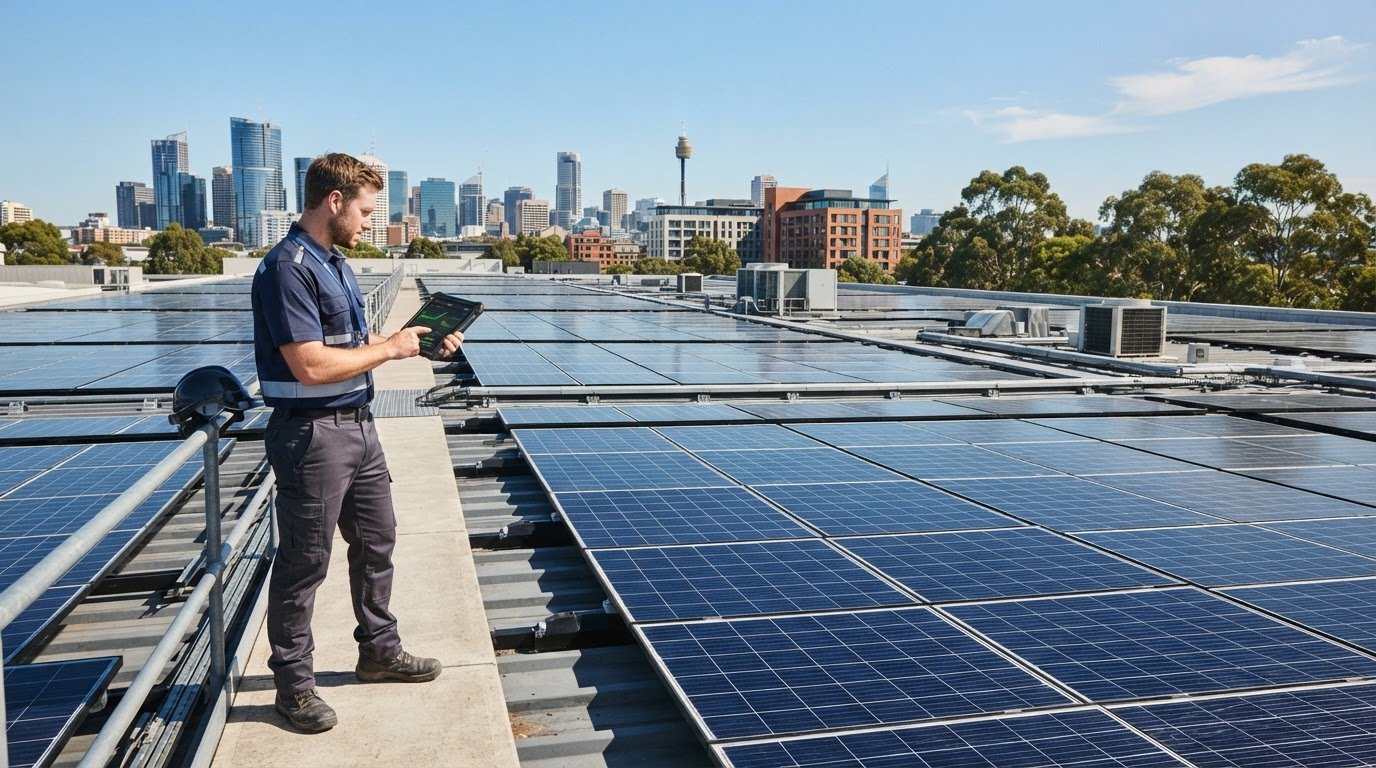
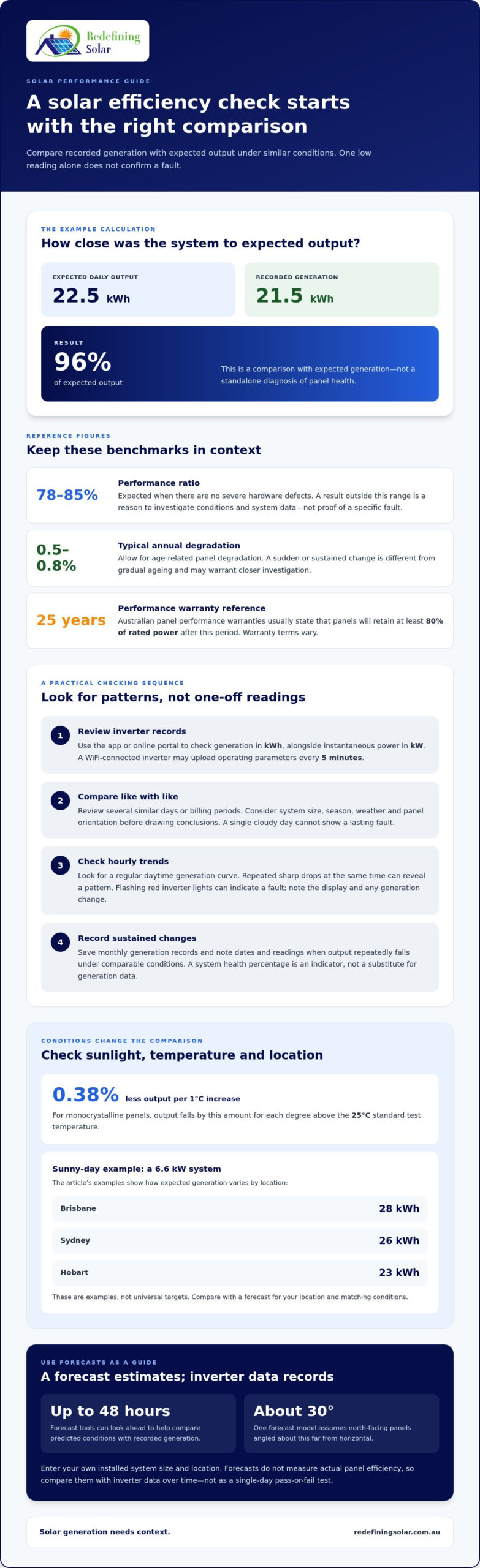
A sunny day alone can’t tell you whether your panels are performing properly. A solar panel efficiency check compares actual energy generation with expected output under similar conditions. For example, if expected daily output is 22.5 kWh and your system generates 21.5 kWh, the result is 96% of expected output.
It’s understandable to feel unsure when the number on your inverter changes from day to day. Sunlight, panel temperature, shading and dirt all affect generation, so one low reading doesn’t automatically mean there’s a fault.
This guide explains how to compare your system’s output, spot warning signs and check for visible shading or dirt safely from the ground. You’ll also learn how to distinguish normal age-related degradation from a change that may need attention. Follow the steps from checking your inverter and generation records to reviewing the panels and understanding what an efficiency calculation can, and can’t, tell you.
Key Takeaways
- Compare your inverter’s generation readings over time and account for changes in sunlight and weather before judging performance.
- Check hourly power and energy readings for unexpected drops, then look for patterns rather than relying on one reading.
- From the ground, look for dirt, shading, cracks or discolouration that could affect panel output.
- Allow for typical age-related degradation of 0.5-0.8% annually, while watching for sudden changes that may point to a fault.
- Learn how output calculations and professional electrical testing can help distinguish normal variation from a potential problem.
How do you test solar panel efficiency?
Start with your inverter’s monitoring data, then compare generation with expected output under similar conditions. In Australia, panel warranties vary; performance warranties usually state panels will retain at least 80% of rated power after 25 years.
-
Monitor system performance
Open your inverter’s monitoring app or online portal and review generation in kilowatt-hours (kWh), not just instantaneous power output in kilowatts. A WiFi-connected inverter can send operating data to the cloud; a 10 kW string inverter may upload parameters every 5 minutes. Compare daily and monthly trends, and note dates when generation changes. A single cloudy day cannot indicate a lasting fault.
According to consumer research surveys, many Australian solar owners do not know whether their system is performing properly, while others track performance through an inverter’s online interface. Regularly reviewing the connected system’s records can help you detect a change sooner. Some monitoring tools also show a system health figure from 0% to 100%; treat it as an indicator, not a substitute for generation data.
-
Check system performance
Compare your solar system’s recorded output with its expected generation for the same period. Check the system size, season, weather and panel orientation before drawing conclusions. Performance ratio offers another comparison: values of 78% to 85% are expected when there are no severe hardware defects. A result outside that range is a reason to investigate conditions and system data, not proof of a specific fault.
For a useful comparison, review several similar days or billing periods rather than relying on one reading. Inverter readings show energy generated, while a household meter also reflects electricity use and grid imports or exports. These figures describe different things. If generation repeatedly falls under comparable conditions, record the dates and readings for a closer assessment.
-
Use a forecast as a guide
Select your location in a solar forecast tool, then enter your installed system size. A common Australian residential example is a 6.6 kW system, but use your own panel capacity for a relevant estimate. Forecasts can look up to 48 hours ahead, helping you compare predicted conditions with recorded generation. Check the tool’s assumptions too: one forecast model assumes north-facing panels angled about 30 degrees from horizontal.
Forecasts estimate likely generation; they don’t measure your panels’ actual efficiency. Cloud cover, orientation and seasonal sunlight all affect the comparison. Use forecasts alongside inverter data over time, rather than treating a single predicted day as a pass-or-fail test.
-
Compare trends before acting
Save monthly generation records and compare periods with similar sunlight and weather. A third-party monitor may express system health as a percentage, while inverter records show energy generated. Interpret both in context. A steady pattern helps establish what’s normal for your roof, while sustained changes in readings can indicate when further investigation is worthwhile.
Keep the inverter’s system size and monitoring history handy when reviewing results. If a forecast and actual generation differ, check that their time periods and assumptions match before interpreting the gap. This makes your solar panel efficiency check more useful and helps distinguish ordinary variation from a performance concern.
How can you tell if your solar panels are working?
Use hourly readings to compare your system’s power output and energy generation under similar conditions. Heat, sunlight, season, orientation and inverter sizing all affect what those readings can tell you.
-
Read hourly output and energy
Open your inverter app and compare hourly power output with total electricity generated. Power, measured in kilowatts, is the rate at a particular moment; energy, measured in kilowatt-hours, accumulates over time. A system producing 5 kW for one hour generates 5 kWh.
Look for a regular daytime generation curve, then compare matching hours on similar days. A low reading during cloud cover doesn’t prove a fault. Repeated sharp drops at the same time can reveal a pattern. Flashing red inverter lights can indicate a fault, so note the display and any change in generation.
-
Account for sunlight and conditions
Compare readings with the sunlight and temperature at the time. Solar output is optimal at irradiance of about 1,000 watts per square metre in clear conditions, but panels use sunlight rather than heat. For monocrystalline panels, output falls by 0.38% for each 1°C increase above the 25°C standard test temperature.
In Australia, daylight hours and the sun’s position change with the seasons, while roof orientation affects how much direct sunlight reaches panels. North-facing panels generally receive strong exposure, but east- or west-facing arrays can generate at different times. Where possible, compare the same hours and season rather than treating every day as an identical test.
-
Compare output with expected performance
Check your panel capacity and compare actual generation with a forecast or system estimate for matching conditions. A 6.6 kW system may generate about 26 kWh on a sunny day in Sydney, 28 kWh in Brisbane, or 23 kWh in Hobart. Those examples show why location matters; use a Mornington-specific forecast for your own comparison.
Account for inverter sizing too. A 6.6 kW panel system is often paired with a 5 kW inverter, so the inverter’s rating can limit peak AC power. Most Australian systems peak at about 80% of specified maximum power at midday in summer. A brief peak below the panel rating alone doesn’t determine whether the system is faulty.
-
Check factors that reduce efficiency
Look for heat, shade, dirt and gradual degradation when output falls. Shading from a tree or nearby structure can reduce sunlight reaching panels; dirt and debris can also affect generation. Efficiency typically degrades by 0.5-0.8% annually, so a gradual decline differs from a sudden drop. Higher temperatures can reduce output even on bright days.
To check for a fault, compare monitoring records across similar conditions and inspect the inverter display for warning lights. A repeated fall exceeding 5% of expected output calls for professional testing. Don’t climb onto the roof or handle electrical connections to investigate. If inverter performance remains concerning, solar inverter support may help identify the next practical step.
Step 2: Look up – is there shading or dirt on the panels?
Inspect your panels from the ground and compare visible conditions with changes in measured energy production. Check for shading during peak sunlight hours, then note any dirt, debris or damage that could affect generation.
- Look across the roof from a safe position and check for new shade during the middle of the day. Mornington trees, chimneys and nearby buildings can cast shadows across panels as the sun moves. Note which panel areas are shaded and when; this can help explain a change in actual output. Don’t climb onto the roof to inspect panels or reach over roof edges.
Compare the shading you see with inverter records for the same time. A shadow across panels during strong sunlight can reduce energy production, even if the rest of the array remains clear. If a battery is connected, use the inverter’s solar-generation figure, not battery charging or household consumption, to assess panel production.
- Check panel surfaces from the ground for dirt, leaves, bird droppings and other debris. Look for patches covering part of a panel, not just a uniform layer of dust. A visual check can’t measure the precise output loss, but dirt on the glass can reduce sunlight reaching the cells and affect energy production.
Before cleaning, check the panel warranty’s cleaning guidance. If it allows, use water and a soft cloth, or arrange professional cleaning if dirt remains. Avoid improvised tools or methods that could scratch the glass. Roof access can be hazardous, so don’t step onto panels or attempt work from an unstable ladder.
- Scan visible panel surfaces and frames for cracks, chips, discolouration or parts that look loose. Discolouration and cracks can indicate damage requiring professional attention, even if the system still generates electricity. Note where you see a concern and whether it appears on one panel or several.
From the ground, look at exposed junction boxes and cables for visible damage, sagging or separation. Don’t pull, open or handle electrical components. A dated note recording the panel’s position and appearance gives you a clear comparison if the affected area changes.
- Include the DC isolator in your visual check. It’s usually beside the inverter, and visible ageing may include cracks or unsealed gaps in its casing. Look only: don’t open the unit, operate switches or touch wiring. If you see damage, keep clear and arrange a professional inspection rather than attempting repairs yourself.
Finish by comparing your notes with the inverter’s generated-energy readings. If shading, dirt or visible damage coincides with a change in output, record the time and affected area. This evidence helps distinguish a local issue from a broader change across the solar system.
Age-related panel degradation
Compare your system’s generation with its original performance, allowing for gradual panel ageing. Solar panels typically degrade by 0.5-0.8% annually, so a slow change differs from a sudden drop.
- Find the installation date, panel model and rated output in your original paperwork or system records. Use the installed panel rating as your starting point, not the inverter’s maximum power rating. Those figures describe different components. If available, record the system’s early generation data too, so you have a practical baseline for later comparisons.
Solar panels can last 20 years or more, and performance warranties usually state that panels will still deliver at least 80% of rated power after 25 years. That warranty benchmark is not a promise that your household will generate the same electricity every day. Weather, orientation and system condition also affect actual production.
- Compare generation across similar seasons and sunlight conditions, rather than comparing a summer reading directly with a winter one. Review inverter records over time to see whether output has declined gradually or changed suddenly. A steady downward pattern may fit age-related degradation; a sharp fall is more consistent with a new issue that warrants investigation.
Keep the comparison focused on energy generated by the panels. Your electricity bill also reflects household use, grid imports and exports, and your retailer’s billing arrangements. A higher bill alone can’t show that panel output has degraded. Compare generation records with generation records, using matching periods wherever possible.
- Before attributing lower output to ageing, check for other causes. Bird droppings, dirt, new shading, visible panel damage or an inverter issue can affect generation independently of panel age. Note when the change began and whether it affects the whole array or only part of it. This helps distinguish gradual wear from a local problem.
Check the panel warranty for its product and performance terms, including the period, output threshold and claim conditions. Warranty wording varies by system and manufacturer, so refer to the documents for your installed panels. A performance warranty and a product warranty cover different matters; don’t assume one automatically describes the other.
- Assess long-term output against the warranty’s stated benchmark, not an assumed maximum on every sunny day. The general annual degradation range is 0.5-0.8%, while a performance warranty usually sets a minimum of 80% rated power after 25 years. These figures provide context, but your system’s terms and measured history are more useful for judging its performance.
If generation has fallen steadily, gather the installation details, warranty and inverter records before arranging an assessment. A professional can test whether measured output reflects normal ageing or a fault elsewhere in the system. If panels are damaged or their output is below the applicable warranty threshold, these records help clarify the next steps.
Solar panel efficiency calculations
Calculate the difference between expected and measured production, then distinguish panel efficiency from whole-system performance. A percentage is useful only when you know what it measures.
-
Calculate solar panel efficiency
Start with the system’s expected daily energy production and compare it with the inverter’s actual reading. Divide actual production by expected production, then multiply by 100. For example, 21.5 kWh actual output divided by 22.5 kWh expected output gives 96% when rounded.
That percentage describes output against an estimate, not the panel’s laboratory efficiency rating. The example uses a 5 kW system receiving average daily irradiance of 4.5 kWh/m², giving expected daily DC output of 22.5 kWh. Use figures for the same period and conditions; mismatched forecast assumptions can make the result less accurate.
For a panel-level efficiency calculation, compare its electrical output with the solar energy reaching its surface. A basic electrical output test calculates power by multiplying voltage by current. Professional I-V testing measures open-circuit voltage, short-circuit current, maximum power output and voltage at maximum power. This gives a more complete picture than a single inverter reading.
For an accurate solar panel efficiency check, keep the units and measurement period consistent. Daily energy is measured in kilowatt-hours, while power output is measured in kilowatts. Mixing these readings can produce a percentage that looks precise but describes the wrong comparison.
-
Assess the efficiency percentage
Check whether the percentage refers to an individual panel or the complete solar system. Commercial solar panels commonly have efficiency ratings between 15% and 22%. That rating describes how effectively a panel converts sunlight into electricity under test conditions, not the percentage of expected daily energy your rooftop system produces.
For whole-system performance, performance ratio values should fall within 78% to 85% when there are no severe hardware defects. This is a different measure from panel efficiency. A panel rating and system performance ratio answer separate questions, so don’t compare them as if they were the same result.
Temperature also affects real output. A 400 W panel operating at 70°C may have an actual output limit of 339.2 to 345 W. That lower reading doesn’t by itself show a defect; conditions differ from standard test conditions. Owners should compare measured production with an expected figure that accounts for irradiance and temperature.
If the calculation points to a persistent gap, professional testing can help identify whether panels, wiring or inverter performance explain it. Discuss your solar system’s measured performance when you need help interpreting the figures or planning the next assessment.
Redefining Solar: Battery Ready & Upgrades
Redefining Solar offers a free solar assessment to help you identify a practical next step when monitoring results point to an upgrade or battery-ready setup. If your current system no longer suits your household’s energy use, explore Battery Ready & Upgrades or a residential solar system designed around your needs. For businesses, commercial solar systems can address energy requirements across commercial properties. Solar panel sales and supply-only options are also available for your project.
Bring your generation records and panel details into the discussion so your options relate to your existing setup, rather than assumptions based on a single reading. If you’re ready to discuss your solar needs, contact Redefining Solar.
Turn your readings into a clear next step
Your solar panel efficiency check is most useful when it helps you decide what to do next, not simply produce another percentage. Keep your inverter records and notes about visible changes together. They provide a practical starting point for discussing whether your system needs attention, an upgrade or a different setup.
Redefining Solar offers Battery Ready & Upgrades, Residential Solar Systems and Commercial Solar Systems. These options can support different needs, whether you’re planning battery readiness at home or considering solar for a commercial property. Start with a discussion about your existing system and what you want it to do.
Arrange a conversation with Redefining Solar about your readings and possible next steps. With clear information in hand, you can make a considered decision and feel more confident about the energy your system produces.
Frequently Asked Questions
How does it work?
Solar panels use photovoltaic cells to turn sunlight into direct current electricity, and an inverter converts that electricity into alternating current for household use. The monitoring system records generation from the panels or inverter. For example, a midday reading shows power at that moment, while the daily kilowatt-hour total shows accumulated energy. Comparing readings over time helps you identify changes in system operation.
Step 3: Look at the inverter – is there a red or green light?
A flashing red inverter light can indicate a fault, but light meanings differ between inverter models. Check the display or manual for the exact indicator pattern and record any fault code shown. A green light alone doesn’t confirm normal energy production. Compare the inverter’s status with its generation reading, and note whether the system produces electricity during daylight.
Step 5: How do you know if your solar is producing as much energy as it should?
Compare actual generation with an estimate for the same location, season and weather conditions. Check that both figures cover the same period and use the same units. If the estimate shows daily energy, compare it with the inverter’s daily kilowatt-hour reading, not a momentary power figure. Repeated differences under comparable conditions are more useful than one unusual day.
What professional testing methods give the most accurate results?
Professional I-V testing measures a panel’s electrical curve, including open-circuit voltage, short-circuit current and maximum power output. Thermal imaging can reveal hot spots or uneven heating that may point to cell or connection issues. Electroluminescence imaging can show cracks and microcracks that a standard visual inspection may miss. Together, these methods assess electrical output and less visible panel defects.
When should you get your solar panels professionally tested?
Arrange professional testing if monitoring shows a drop exceeding 5% of expected output, or after severe weather such as hail or high winds. Commercial installations should receive professional solar panel testing annually. Testing can also help when a system has persistent unexplained changes or visible panel damage. Keep monitoring records and dates of weather events available to help focus the inspection.
How do I check the efficiency and output of my solar panels?
Use your inverter’s generation records and compare actual energy with expected production for matching conditions. To calculate the percentage, divide actual energy by expected energy and multiply by 100. For example, 21.5 kWh actual against 22.5 kWh expected equals 96%. Keep the time period consistent, and remember this figure measures performance against an estimate, not the panel’s laboratory efficiency rating.
How do I compare actual solar output with the system’s rated capacity?
Compare instantaneous power in kilowatts with the system’s rated capacity in kilowatts, but treat the rating as a laboratory maximum, not a daily target. A 6 kW panel system has a maximum expected output of 6 kW at one moment under standard laboratory conditions. Real output varies with sunlight, panel temperature, orientation and inverter conversion, so compare readings under similar conditions.
How can I monitor solar panel performance using an inverter or monitoring app?
Open the inverter’s app or online portal and review live power and accumulated energy readings. Check that the selected view shows solar generation, not household consumption, grid imports or battery charging. Save regular readings with their dates so you can compare similar periods. If the app stops updating, compare its last recorded time with the inverter display before interpreting missing data as a generation fault.
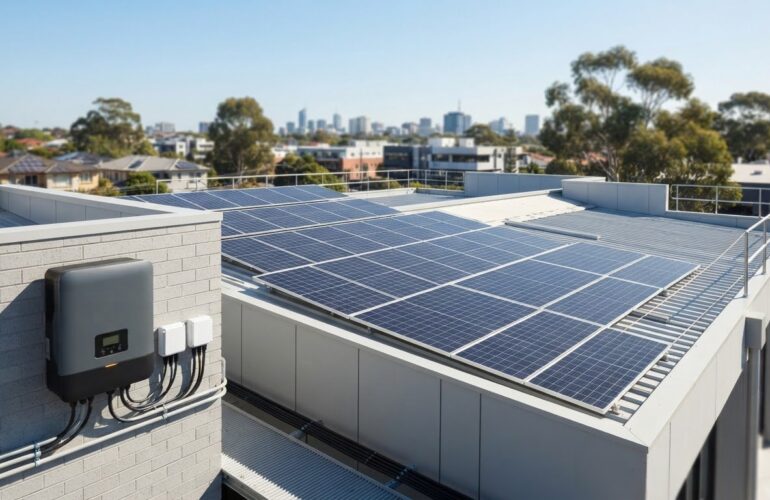
[…] system can lose 10%, 20% or even 30% of its rated output while still appearing operational. Compare your solar panel generation with its own records for similar conditions, rather than relying on one cloudy day or a single reading. For example, a 5 kW array can produce […]